QR Code Drive-Thru: Take Orders From the Car on Your Phone
By Qoorbell Team
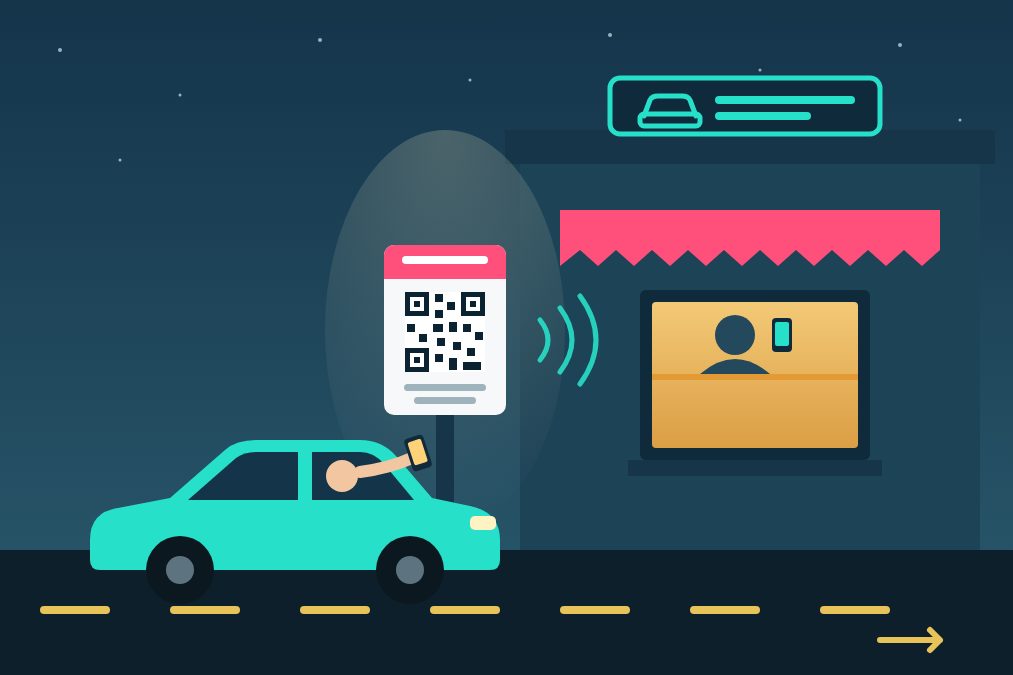
A QR code drive-thru is a printed QR code at the order point of your drive-thru lane: the driver scans it from the car, talks to your staff by video call or chat on their own phone, and then pulls up to the window to pay and pick up. There is no speaker box to buy, no cable to run under the asphalt and no headset to charge. With Qoorbell you create a drive-thru doorbell in about 30 seconds, print its poster and stick it where cars stop.
This guide explains how it works, which businesses it suits, how to place the QR so drivers can reach it, and what to keep in mind before you open the lane.
How a QR drive-thru works
- Create a Drive-thru doorbell. In the app or on the web, choose Drive-thru as the type. The poster and the page the customer sees are worded for a car: "Scan to talk to us from your car".
- Print the poster and put it at the spot where the car stops to order, at the height of the driver's window.
- The driver scans it with the phone camera. A page opens in the browser, with no app and no account, and they start a video call or a chat.
- Your team answers on their phones, wherever they are: behind the counter, in the kitchen or in the back room.
- The customer drives up to the window, where the order is ready or about to be.
If your customers are not used to QR codes, this short guide on how to scan a QR code with your phone is worth linking next to the poster.
Why a QR code instead of a speaker box
- Clear sound. The customer talks into their own phone, not into a crackling speaker next to a running engine.
- Chat when it is noisy. In heavy traffic or for customers with hearing difficulties, typing the order is easier than shouting it.
- Video when it helps. A customer can show a prescription box, a broken part or the label of the product they want.
- Nothing to install or repair. No wiring, no power at the lane, nothing for rain or a bumper to break. A new lane is one more poster.
- It still works when you are short-staffed. The call reaches every phone on the team, so whoever is free picks up.
You do not have to remove your current intercom. Many businesses start with the QR as a second option next to it, or as the backup for the day the speaker stops working.
Which businesses it suits
- Pharmacies with a pickup window, where customers need to ask questions privately.
- Coffee kiosks and small restaurants that want a drive-thru without the cost of a full ordering system.
- Banks, exchange offices and service windows where the customer needs a quick answer before pulling up.
- Laundries, dry cleaners and pickup counters for orders that are ready in a few minutes.
- After-hours pickup windows that only open when someone calls.
How to place the QR so drivers can reach it
- At the height of the driver's window, about an arm's length from where the car stops. If customers have to open the door or get out, it is too far.
- Big enough to scan from the seat. Qoorbell opens the Drive-thru poster on its window-card size; do not shrink it.
- Lit at night. A QR in the dark is a QR nobody scans. A small light or a reflective frame is enough.
- Protected from sun and rain with a laminated sheet or an acrylic frame.
- With one clear line, such as "Scan, tell us what you need, then drive up to the window". The poster already includes it.
- Test it from a car, in daylight and at night, before you open the lane.
Opening hours, location and privacy
On the paid plans you can set the doorbell's opening hours: outside them it does not ring (or, if you prefer, the customer can leave you a message), and the customer's page can say when you open next. You can also require the customer to be at the drive-thru (location check), so a photo of the QR shared on social media cannot ring your staff from across town.
The customer never sees your phone number, and your team never sees theirs. If someone misuses the doorbell, you can block them. If an employee leaves, you remove them from the doorbell; nothing to reprint.
What to keep in mind
- The customer needs a phone with mobile data. Keep a simple fallback, such as "No phone? Pull up to the window".
- It is for talking, not for paying. The customer pays at the window as usual.
- Call length depends on the plan. The free plan allows calls of up to 2 minutes and shows ads; paid plans allow longer calls (Pro: 5 minutes), no ads and recorded visits.
If your business also has a regular front door, our guide on serving customers when your business is closed shows how to use the same idea at the entrance.
Frequently asked questions
Does the customer need to install an app?
No. They scan the QR with the phone camera and the call or chat opens in the browser.
Can several employees answer?
Yes. Share the doorbell with your team and the call reaches everyone who has it.
Can I have one QR per lane?
Yes. Create one doorbell per lane or per window, each with its own poster, so your team knows where the customer is.
What happens if nobody answers?
The customer can leave a chat message, and you reply as soon as someone is free.
How much does it cost?
You can start for free. Paid plans add longer calls, no ads, opening hours and the location check.
Conclusion
A drive-thru does not need an expensive intercom to work. A QR code at the order point lets drivers talk to your team from their own phone, by voice, video or chat, and then pull up to the window. Create your free drive-thru QR and test it with your own car today.
- drive-thru
- small business
- customer service
- QR doorbell