A building or a complex with one QR code
Set up an apartment building, an office building or a gated community: one QR at the entrance, a directory of doors, numbered series, residents and handover.
In a building, nobody wants a poster for every door at the street entrance. With Qoorbell you put one QR code at the entrance; the visitor scans it, sees a short directory and picks the door to ring. Each door still rings only the people who live or work behind it.
Building or complex
- A building with several doors — an apartment building, an office building, a hotel. One QR at the entrance; visitors pick the door.
- A complex with several buildings — a gated community, a campus, a business park. One QR at the gate; visitors pick the building, then the door.
Choose one of these at the first step of the setup wizard (“What is this doorbell for?”). Every plan includes unlimited groups and unlimited doorbells.
Adding the doors
The wizard asks for the buildings (for a complex) and then the doors. Type them one by one, or use “Add a numbered series”: give a prefix such as “Apt ” and a range from 101 to 120, and the wizard shows what it will add before it does. Doors that are not inside any building — houses at the gate — can be added too, and visitors see them right after scanning the gate QR.
If you already have doorbells, “Include doorbells you already have” moves them into the group. They keep their QR code and settings, and they also appear in the entrance directory.
Each door also gets its own QR code. Residents can put it on their own door, while the entrance QR serves everybody.
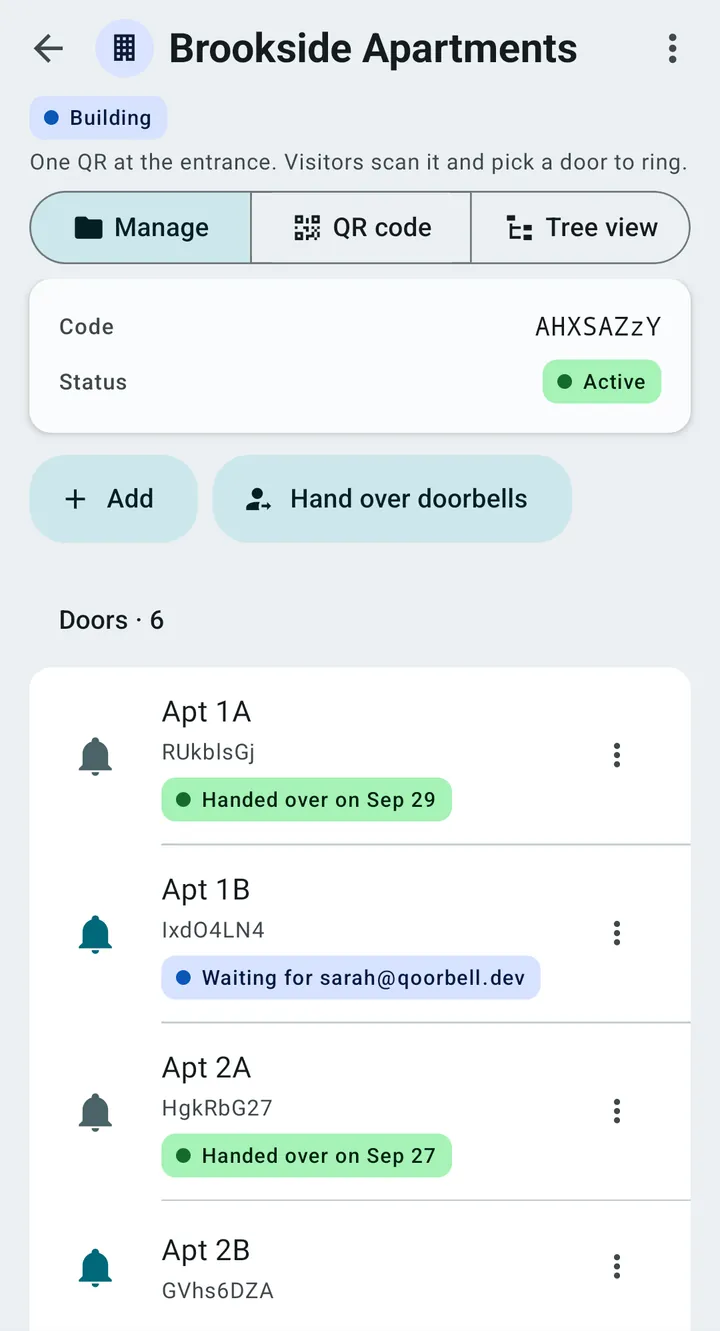
Residents: members or handover
You invite people to a door by email, or by phone where phone invitations are available in that number’s country. When you invite, you choose what happens when they join:
- Add as a member — I stay the owner. They receive the door’s rings too, and you keep managing it.
- Hand over — I stop being the owner. They become the owner, and you and everyone else lose access: no rings, no history, no settings. Its past rings and chats are deleted, so the new owner starts with a clean history.
Until the resident accepts, a handed-over door keeps ringing you, and the list shows “Waiting for” their address. After they accept it shows the date it was handed over. The door stays listed in the building directory so visitors at the entrance can still find it; that listing gives nobody access to the resident’s doorbell.
Restricting the entrance
A building or a complex can require visitors at the entrance to be on site (a geofence of 10 to 1,000 metres) or to sign in before ringing. These two features apply to the top-level group’s QR code and are counted per group: up to 3 groups on Premium and unlimited on Enterprise. See Geofence and visitor sign-in.
Print the entrance QR on the Lobby design: the building’s name leads, so visitors know at a glance that they are scanning the right code.