- wireless doorbell
- video doorbell
- buying guide
- virtual doorbell
Best Wireless Doorbell in 2026: How to Choose (and the One That Needs No Installation)
By Qoorbell Team
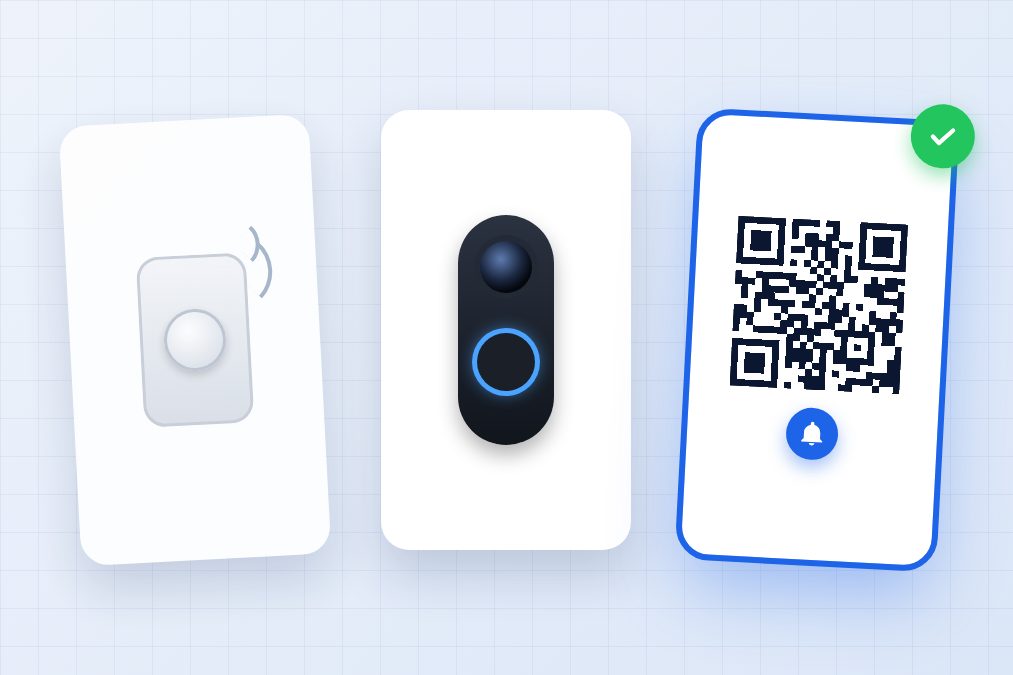
Your old doorbell stopped working, you just moved into an apartment where the buzzer has never worked, or you are tired of missing deliveries. Either way you are looking for a wireless doorbell — and the choice is bigger than it looks. Some cost less than a pizza, some cost as much as a phone, and some come with a monthly bill you only discover after installing them.
This guide explains the types of wireless doorbell that exist in 2026, what really matters when you compare them, which one suits a house, an apartment or a business, and an option most guides leave out: a doorbell with no hardware at all.
The 3 types of wireless doorbell
1. Classic wireless chime
A battery button outside and a receiver you plug into a socket inside. You press it and a melody plays. They are cheap (usually $15–$40), take five minutes to set up and need no Wi-Fi. The downside: you only hear it if you are at home and close enough to the receiver, and you never know who is at the door.
2. Wi-Fi video doorbell
A button with a camera that connects to your Wi-Fi and calls your phone, so you can see and talk to the visitor from anywhere. Prices typically run from $50 to $250. They are the most complete option, but almost all of them need mounting, a strong Wi-Fi signal at the door, regular battery charging or doorbell wiring — and many lock recordings and key features behind a monthly subscription.
3. Virtual (QR) doorbell
No device at all: a printed QR code on your door. The visitor scans it with their phone camera and your phone rings with a video call or a chat. It costs nothing, needs no installation, no batteries and no Wi-Fi at your door, because it uses the visitor's phone. It is the newest category and the one that fits renters and apartments best.
What to look at before you buy
- Range: for a classic chime, check the distance between button and receiver (100–300 metres in open air, much less through concrete walls).
- Power: batteries (convenient, but they run out at the worst moment), plug-in receiver, or existing doorbell wiring.
- Wi-Fi at the door: video doorbells drop calls when the signal at the entrance is weak. Test it with your phone before buying.
- Answering away from home: if you want to talk to the courier while you are at work, you need a video or virtual doorbell — a chime will not help.
- Subscription: read the small print. Many video doorbells save recordings or enable key features only with a monthly plan, which over three years can cost more than the device.
- Weather resistance: anything outdoors should handle sun and rain (look for an IP rating such as IP44 or higher).
- Theft: doorbells mounted outside can be stolen. A cheap button or a printed code is a smaller loss than a $200 camera.
- Privacy: who can see your camera, where recordings are stored, and whether visitors see your phone number.
Which doorbell for which home
- House you own, good Wi-Fi at the door: a video doorbell is worth it if you want recordings. Budget for installation and check the subscription before you choose.
- Renting or living in an apartment: you usually cannot drill or touch the building's wiring. A classic chime or a virtual QR doorbell avoids asking anyone for permission.
- Apartment building or gated community: replacing an intercom panel is expensive. A QR code at the entrance with a doorbell for each apartment lets every resident answer on their phone.
- Small business, office or reception: you want staff to receive visitors wherever they are; a virtual doorbell shared with the team does that without hardware.
- Older relatives or limited budget: a classic plug-in chime is simple and reliable inside the home.
The option that needs no installation: a QR doorbell
Qoorbell turns a printed QR code into a doorbell. You create it in the app or on the web in about 30 seconds, print the poster it generates and stick it on your door. When someone scans it, your phone rings with a video call or a chat — at home, at work or on holiday.
- Nothing to install: no drilling, no wiring, no batteries and nothing to steal.
- No Wi-Fi needed at the door: the call uses the visitor's phone.
- Answer from anywhere: talk to the courier while you are out and tell them where to leave the package.
- Share it: everyone in the home or on the team can receive the rings.
- Privacy: visitors never see your phone number; you can block someone, pause the doorbell or set quiet hours.
- Free to start, on Android, iPhone and the web.
What it does not do: it does not record your doorstep 24/7 like a security camera. If you want continuous recording, combine a camera with a QR doorbell, or choose a video doorbell with a plan.
Frequently asked questions
Do wireless doorbells need Wi-Fi?
Classic chimes do not: the button talks directly to the receiver by radio. Video doorbells do. A QR doorbell does not need Wi-Fi at your door, because it uses the visitor's mobile connection.
How long do the batteries last?
In a classic chime button, usually one to two years. In battery video doorbells, from a few weeks to a few months, depending on how many visitors and motion alerts you get.
Can I install a doorbell if I rent?
Yes, as long as you do not drill or change the wiring: adhesive chime buttons and QR doorbells are the safest choices for tenants.
Do I have to pay a monthly fee?
Classic chimes, never. Many video doorbells, yes, for recordings and some features. A QR doorbell like Qoorbell can be used for free.
Conclusion
If you only need to hear the door inside your home, a classic wireless chime is enough. If you want to see and record your entrance and you own your home, a video doorbell makes sense — check the subscription first. And if you want to answer the door from anywhere, without installing anything or paying for hardware, a QR doorbell is the simplest option. Create your free doorbell and have it on your door today.